IAM manages users, groups, roles, and the policies that control access to AWS resources. These notes cover the policy JSON structure, IAM roles, and IAM security tools.
IAM - Users, Groups
- Root Account is a default account
- Users are people, can be grouped, group is not compulsory and can be added to multiple groups
- Groups can have only users and not other groups
- Users/Groups can be assigned policies/permissions, its in form of a JSON
IAM Policies/Permissions
- Inline policies are directly attached to the user
- Managed Policies - Predefined by AWS or user-created policies that can be used across multiple entities
- Policies are generally attached to a group, and group/s is/are assigned to user/s
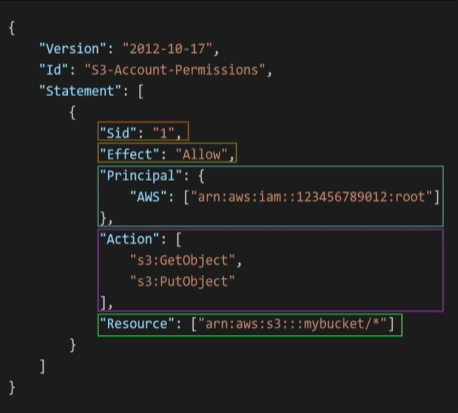
- Important to remember the JSON structure
- Level1 - Version, Id, Statement - Array of multiple statements
- Statement object -
- sid - Optional
- Effect - Allow/Deny
- Principal - Account/User/Role/Aws-Service on which the resource-based policies will be applied
- Actions - List of allow or denies actions
- Resource - list of resource to which the actions applies
- Condition - Optional, for when the policy is in effect
- Resource-Based Policies - attached to resources directly
- Identity-Based policies - attached to IAM entities (users, groups, roles)
IAM Role
- A role which an AWS service can assume, and perform actions. For example, S3 triggering Lambda Invocation
IAM Security Tools
- Credentials Report - List all users and status of credentials
- Access Advisor - Shows service permissions granted and last accessed